Is there a countdown calendar on iPhone?
Not built in: the iPhone's Calendar app shows your dates but never counts down to them. Event Countdown adds exactly that, a month view with every event marked and the days remaining under each one, plus countdown widgets for your Home Screen and Lock Screen.
What the built-in Calendar app can and cannot do
The iPhone's own Calendar app is excellent at showing what happens when. What it does not do is answer the question countdown people actually ask: how long until it? There is no days-to-go on any event, no countdown widget, and nothing on the Lock Screen counting toward a date.
What a countdown calendar looks like
Event Countdown's Calendar View is a month grid of your own events, colour-coded, with the full list and days remaining underneath. Swipe between months, tap any day, and open a live countdown for any event on it.
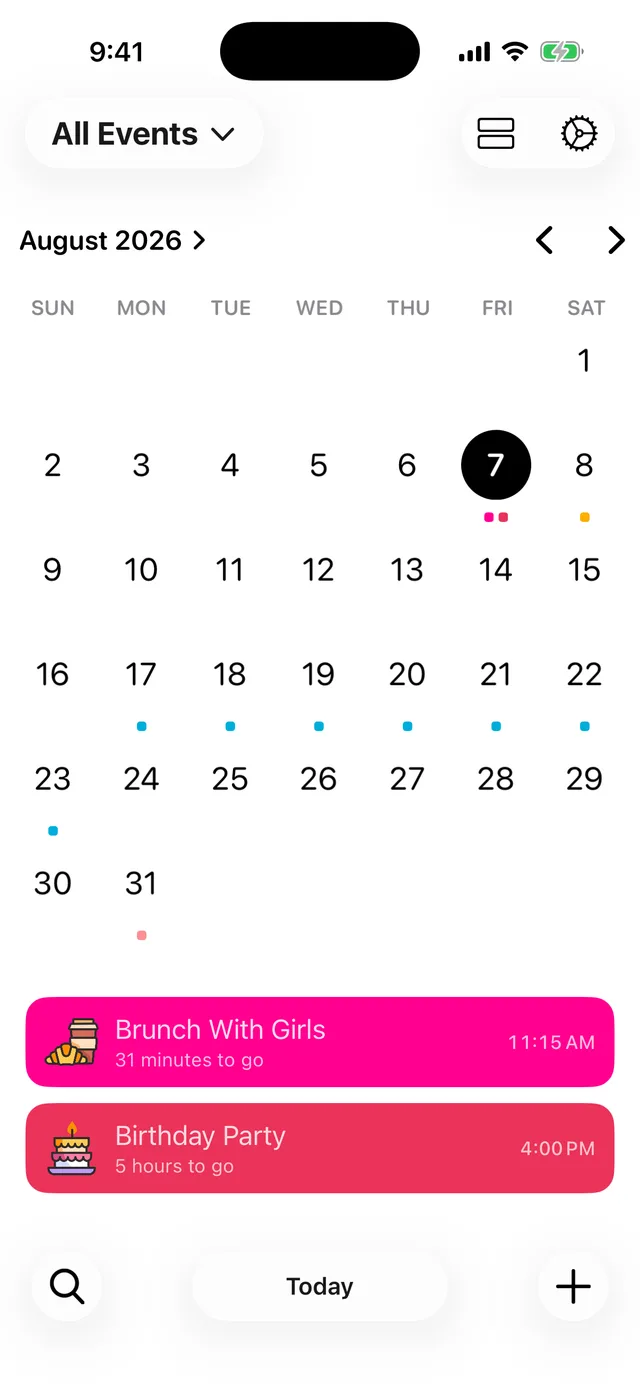
Alongside the calendar you get the classic countdown list, Home Screen and Lock Screen widgets, and a Live Activity that counts through the final hours on the Lock Screen and in the Dynamic Island.
Free to try
The app is free to download with unlimited countdowns and no account needed. Calendar View is part of Premium, and you can try it by unlocking Premium for 24 hours with a short video. See What Premium includes for the full picture, or jump straight to a date with how many days until Christmas.
Free on iPhone, iPad and Android. Counting down since 2015.