
Live Activity and the Dynamic Island
When a big date is hours away, the countdown appears on your Lock Screen and in the Dynamic Island automatically.
When a big date is nearly here, the countdown steps outside the app. That is the Live Activity: a card on your Lock Screen, and a compact countdown wrapped around the camera on iPhones with the Dynamic Island. There is nothing to set up.
When it appears
The Live Activity starts on its own when your soonest upcoming event is less than 12 hours away, and counts down to the moment itself:
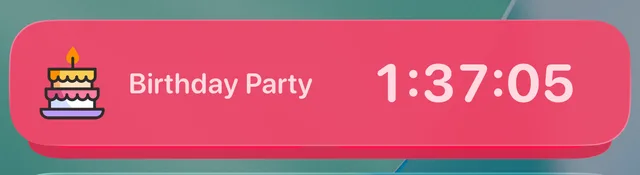
On iPhones with the Dynamic Island you also get the compact version at the top of the screen, whatever you are doing:

One event shows at a time, always the soonest, and it retires once the event arrives. Tap it at any point to open the full countdown. On very long runs iOS itself may dim the card towards the end; the time it shows stays correct.
Turn it off, or back on
In the app, open Settings (the gear), scroll to Notifications, and flip Live Activity. Your iPhone's own Settings page for the app has a Live Activities switch too; both need to be on for the card to appear.
Part of Premium
Live Activities are a Premium feature, like the widget collection: see Widgets: every type at a glance.
Did this not solve it? Contact us and include what you tried. In the app, Settings then Contact Support attaches the details that help us find your account.