
Feature guideiOS & AndroidUpdated 7 August 2026
See your events on a calendar
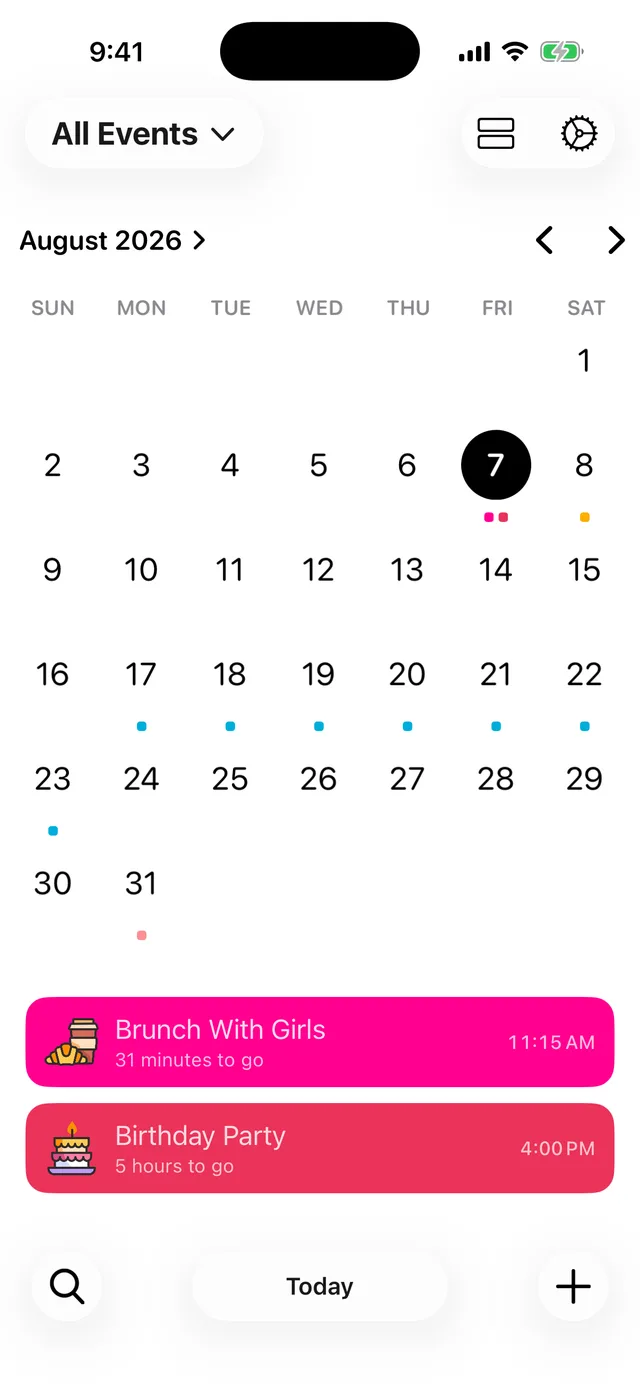
A month grid with a coloured dot on every day you have something planned.
Calendar View lays your countdowns out the way you already think about dates: as a month.
Open it
Tap the calendar icon at the top of your events list. Tap the list icon to switch back.
Reading the grid
- Every day with an event gets a dot in that event's colour. A day with several events shows several dots.
- A multi-day event, like a holiday with an end date, shows a dot on every day it covers.
- Tap any day and its events appear underneath, in their colours, with times.
- Use the arrows to move between months, or tap Today to jump back.
The calendar gets out of your way
Scroll down and the calendar slides away so your event list gets the full screen. Scroll back up to bring the month back.
Part of Premium
Calendar View is a Premium feature. If you are not subscribed you can unlock it for 24 hours by watching a short video, or subscribe to keep it. See What Premium includes.
Did this not solve it? Contact us and include what you tried. In the app, Settings then Contact Support attaches the details that help us find your account.